Quick Start
Built for modern databases and cloud warehouses
Section titled “Built for modern databases and cloud warehouses”Sprinkle is designed for modern databases and warehouses.
A list of all supported data warehouses and the setup instructions are given below:
- AWS Athena
- AWS Redshift
- Azure Synapse
- Databricks
- Google BigQuery
- MySQL
- Postgres
- Snowflake
- SQL Server
Integrating your data
Section titled “Integrating your data”In case you don’t have a data warehouse or your data is fragmented in different systems, Sprinkle helps you unify all your data into your data warehouse using the Datasource connectors. These connectors ingest data into your data warehouse, and these ingestion pipelines can be setup in just a few clicks via the Sprinkle web console.
If you already have a data warehouse and all your required data is present in it, you can skip to the next section, Transforming Your Data.
#1: Real-time Ingestion Pipelines
Section titled “#1: Real-time Ingestion Pipelines”Ingest data in real-time into your data warehouse using incremental mode, where only changed or new data is ingested.
#2: Automatic Schema Mapping
Section titled “#2: Automatic Schema Mapping”Sprinkle automatically maps the source schema to the destination (data warehouse) schema.
#3: Live monitoring and control
Section titled “#3: Live monitoring and control”Sprinkle console shows live replication stats like the number of rows and data size moved.
.gif)
Live monitoring of data ingestion
A list of all supported data sources and the setup instructions are given below.
#4: Datasources
Section titled “#4: Datasources”Read more about datasources here.
Transforming your data
Section titled “Transforming your data”Before the data is used for analysis, we sometimes need to transform it to make it more analytics-friendly. Transforming your data means creating a derived table from the set of input (mostly raw data) tables.
Sprinkle provides two ways to do data transformations:
#1: Transform data using SQL
Section titled “#1: Transform data using SQL”For creating a derived table from a set of input tables, you can use SQL Transform.
SQL Transform helps you write SQL queries using the SQL dialect supported by the warehouse. Whatever SQL you write gets executed on the warehouse directly.
Simply put, SQL Transform is the advanced SQL Editor where you can write queries, see the results, and schedule the SQL script.
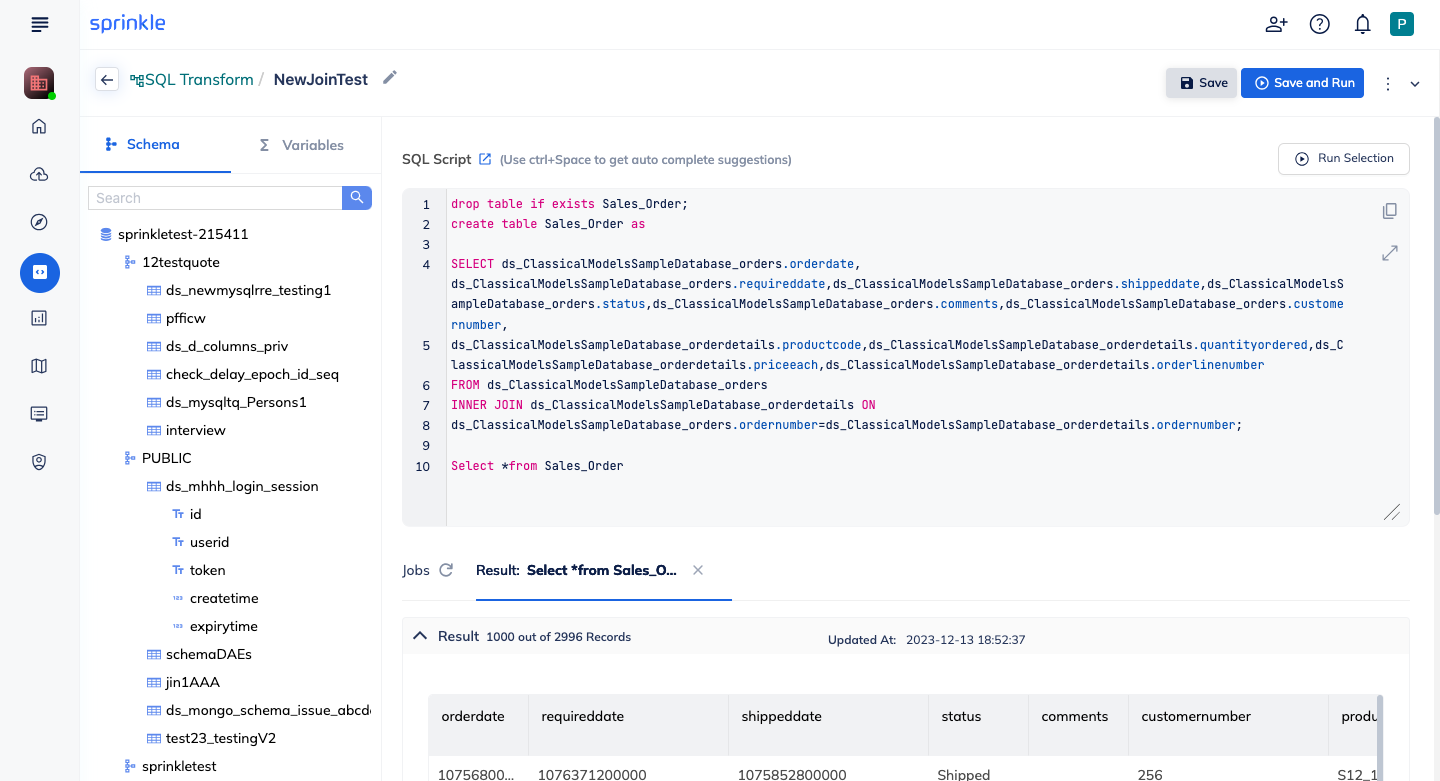
Sprinkle SQL Transform
#2 Transform data using Python
Section titled “#2 Transform data using Python”In certain cases, you want to use python libraries for data manipulation and preparation. Sprinkle provides a Notebook feature, via which you can write Python code and do data exploration within the Notebook editor itself. The python code gets executed on the Kubernetes cluster in the Data Plane. You can schedule the entire Notebook to run your python code at regular intervals.
#2: Transform data using Python
Section titled “#2: Transform data using Python”In certain cases, you want to use Python libraries for data manipulation and preparation. Sprinkle provides a Notebook feature, via which you can write Python code and do data exploration within the Notebook editor itself.
The Python code gets executed on the Kubernetes cluster in the data plane. You can schedule the entire notebook to run your Python code at regular intervals.
Analyzing your data
Section titled “Analyzing your data”Got 2 mins? Check out the video:
#1: Build business metrics using data models.
Section titled “#1: Build business metrics using data models.”Data models help analysts build business metrics and dimensions via a visual interface. Analysts can join tables, create custom expressions, and validate data all from the visual console. This reduces the manual work that would otherwise be needed from analysts for building reports. You can create models directly on warehouse tables without any data loading, unlike traditional BI tools.
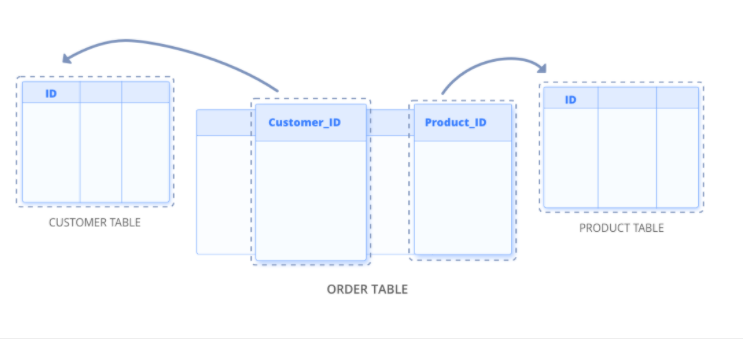
.gif)
Define business measures and dimensions directly on warehouse table
#2: Drag and Drop Analysis Using Reports
Section titled “#2: Drag and Drop Analysis Using Reports”Sprinkle Reports help data consumers analyze data with drag-and-drop functionality and build visualizations.
Unlike traditional BI tools, you can analyze data at any granularity without being a data expert. Data consumers can dive deeper into the data by building their own custom analyses and reports.
Sometimes you may quickly want to build a report for which there isn’t a model defined yet. In that case, you can use SQL to build the report and create visualizations. You get a powerful SQL editor with an inbuilt Schema browser.
You can also build reports directly using tables with our intuitive report builder UI.
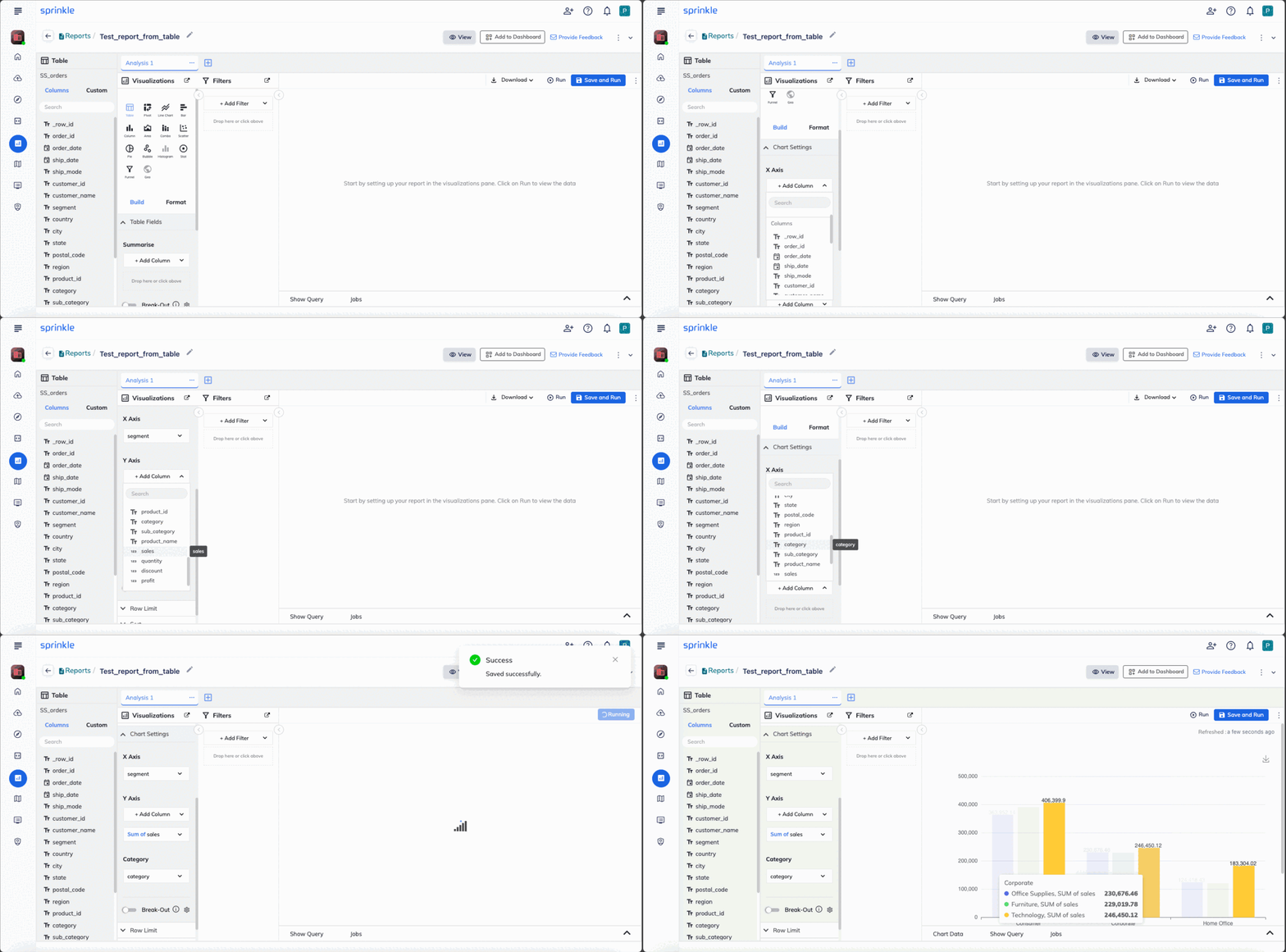
Drag and Drop Interface
.png)
SQL based Report Builder
#3: Create dashboards combining multiple reports.
Section titled “#3: Create dashboards combining multiple reports.”- You can combine multiple reports to create dashboards.
- You can filter the data in one go easily across all the reports within a dashboard.
- You can share the dashboard with others, download it as a PDF, schedule refreshes, and do drill-downs and drill-ups.
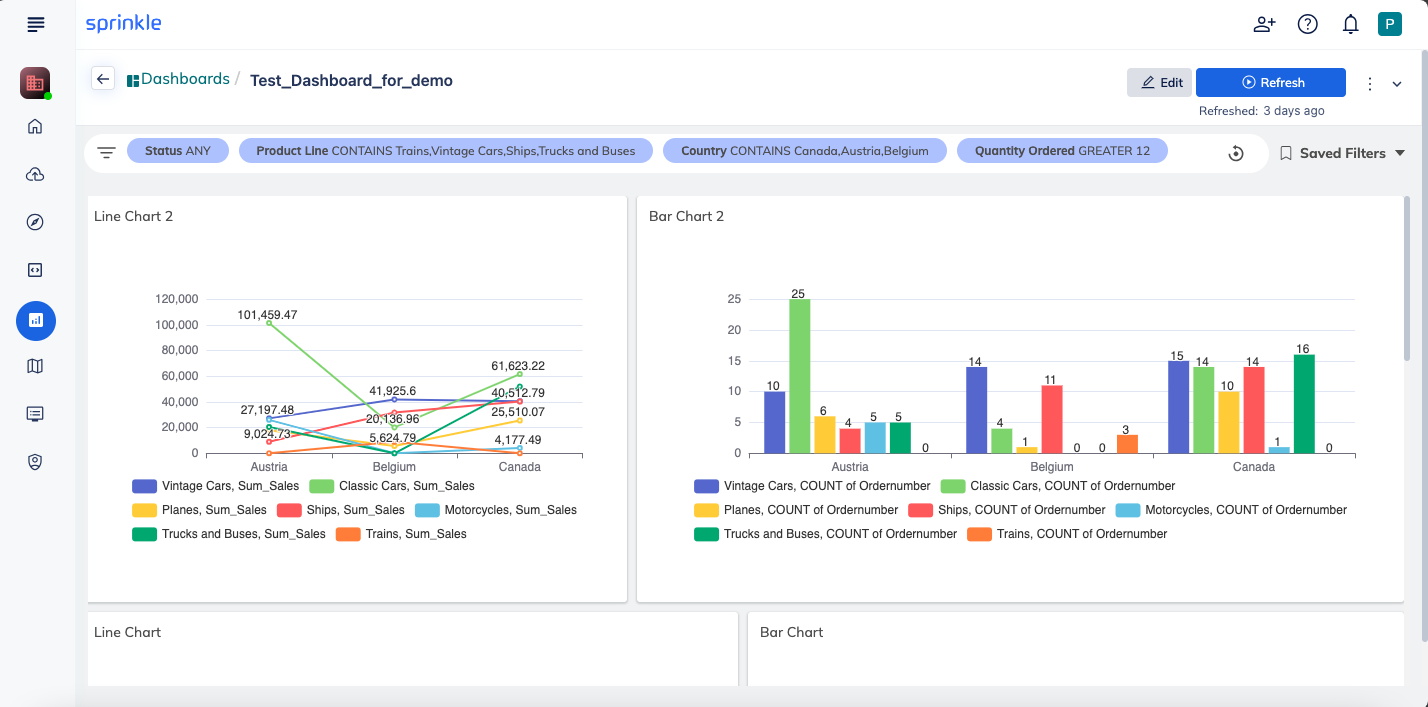
Managing Schedules and Data Refreshes
Section titled “Managing Schedules and Data Refreshes”#1: Scheduling data sources and reports
Section titled “#1: Scheduling data sources and reports”Sprinkle lets you schedule your data ingestion or report refreshes as per the desired frequency interval. You can schedule data sources, reports, etc., to run periodically.
You can also set up email notifications if a schedule fails, succeeds, or is delayed. Learn more about notifications here.
#2: Automatic data dependencies
Section titled “#2: Automatic data dependencies”Sprinkle finds out all the dependencies across different transformations and reports automatically, and it schedules all the data refreshes in a pipeline. You can learn more about data dependencies here.
User Management
Section titled “User Management”Sprinkle provides fine-grained access controls. Specific data can be shared with only a specific set of users. Refer to User Management for more details.
Data Security
Section titled “Data Security”Sprinkle is fully secure.
Learn more about security at Sprinkle here.
Data Security
Section titled “Data Security”Sprinkle is fully secure. Learn more about security at Sprinkle here.